Home Blog Page 54

Why Indianapolis Companies Rely on Managed IT Services

0

In the bustling business landscape of Indianapolis, staying ahead of the curve is crucial. From tech startups to established enterprises, companies are increasingly turning to managed IT services to streamline operations, enhance security, and focus on growth. But what exactly makes managed IT services such a game-changer? Here are seven compelling reasons why Indianapolis businesses are making the switch.

Enhanced Security

With cyber threats becoming more sophisticated, robust security measures are non-negotiable. Managed IT service providers offer advanced security solutions, including real-time monitoring, threat detection, and automatic updates. According to a study by Cybersecurity Ventures, cybercrime is expected to cost the world $10.5 trillion annually by 2025, making security a top priority for businesses of all sizes.

Practical Tip:

Consider conducting regular security audits with your managed IT provider to stay ahead of potential vulnerabilities.

Cost-Effective Solutions

Hiring an in-house IT team can be costly, especially when you factor in salaries, benefits, and ongoing training. Managed IT services offer a more cost-effective alternative by providing access to a team of experts at a fraction of the cost. A report by Deloitte found that companies can save up to 30% on IT costs by outsourcing.

Practical Tip:

Look for managed IT providers that offer scalable solutions, allowing you to adjust services as your business grows.

Access to Expertise

Managed IT service providers bring a wealth of expertise and specialized knowledge to the table. Whether it’s cloud computing, data management, or cybersecurity, these professionals have the skills needed to tackle complex IT challenges. This ensures that your business benefits from the latest technological advancements without the steep learning curve.

Practical Tip:

Schedule regular consultations with your managed IT provider to stay informed about new technologies and trends.

Improved Focus on Core Business

Managing IT infrastructure can be time-consuming and distract from core business activities. By outsourcing IT tasks, companies can focus on what they do best—whether that’s developing new products, improving customer service, or expanding into new markets.

Practical Tip:

Identify key areas where you can reallocate resources and time saved through managed IT services to boost productivity and innovation.

Scalability and Flexibility

One of the most significant advantages of managed IT services is their scalability. Whether you’re experiencing rapid growth or seasonal fluctuations, managed IT providers can adjust their services to meet your needs. This flexibility ensures that your IT infrastructure can support your business’s evolving demands.

Practical Tip:

Work with your managed IT provider to develop a scalable IT strategy that aligns with your business goals.

Proactive Maintenance and Support

Managed IT service providers offer proactive maintenance to prevent issues before they become major problems. This includes regular system updates, patch management, and performance monitoring, ensuring that your IT systems run smoothly and efficiently. According to CompTIA, proactive IT management can reduce downtime by up to 50%.

Practical Tip:

Set up automated reports from your managed IT provider to keep track of maintenance activities and system performance.

Disaster Recovery and Business Continuity

Natural disasters, power outages, or cyber-attacks can bring business operations to a halt. Managed IT services include disaster recovery and business continuity plans to minimize downtime and ensure that your company can quickly recover from unforeseen events. The Federal Emergency Management Agency (FEMA) reports that 40% of businesses do not reopen after a disaster, highlighting the importance of having a solid recovery plan.

Conclusion

For Indianapolis companies, the benefits of managed IT services are clear. From enhanced security and cost savings to access to expertise and improved business focus, the advantages are manifold. If you’re ready to take your business to the next level, consider partnering with a managed IT service provider to unlock new opportunities for growth and innovation.

How to Tailor Backup Solutions to Your Business Needs

0

In a digital age where data fuels operations, ensuring that your business has a reliable and efficient backup solution is crucial. Data loss can lead to disruptions, financial loss, and even damage to your company’s reputation. This listicle will guide you through practical steps to customize backup solutions that align perfectly with your unique business requirements.

Assess Your Data Needs

The first step in tailoring a backup solution is understanding the nature and volume of your data. Not all data is created equal; some documents may be critical to your business operations while others might be less essential.

Key Considerations:

Volume of Data: Evaluate how much data you generate daily, weekly, and monthly. For example, a small business may handle gigabytes, while a medium-sized enterprise might deal with terabytes.

Data Sensitivity: Identify data that is sensitive or classified, such as customer information or proprietary business plans. According to a study by IBM, the average cost of a data breach in 2021 was $4.24 million, highlighting the importance of protecting sensitive data.

Access Frequency: Determine how often you need to access different types of data. Frequently accessed data should have faster backup and retrieval processes.

Choose the Right Backup Type

Different backup types serve various needs. Selecting the right one for your business ensures that you have efficient and effective backups.

Key Backup Types:

Full Backup: Backs up all data. It’s comprehensive but time-consuming and uses significant storage. Suitable for businesses with ample storage capacity and periodic full backups.

Incremental Backup: Backs up only the data that has changed since the last backup. It’s faster and uses less storage space. Ideal for businesses with limited storage but requires the last full and all subsequent incremental backups for a complete restore.

Differential Backup: Backs up data that has changed since the last full backup. Balances between full and incremental backups in terms of time and storage. Requires the last full and the latest differential backup for complete restoration.

Opt for Scalable Storage Solutions

Your business requirements may grow, and your backup solution should accommodate this growth without significant overhauls.

Tips for Scalability:

Cloud Storage: Opt for cloud-based solutions like AWS, Google Cloud, or Microsoft Azure, which offer scalable storage options. According to Statista, the global cloud storage market is expected to reach $137.3 billion by 2025, indicating widespread adoption due to its flexibility.

Hybrid Solutions: Combine on-premises and cloud storage to balance speed, control, and scalability. This hybrid approach enables quick local restores and cloud-based scalability for long-term storage.

Implement Robust Security Measures

Data security is paramount when it comes to backup solutions. Ensuring that your backups are secure helps protect against data breaches and cyber-attacks.

Security Best Practices:

Encryption: Encrypt data both at rest and in transit to safeguard against unauthorized access.

Multi-Factor Authentication (MFA): Implement MFA to add an extra layer of security for accessing backup systems.

Regular Audits: Conduct regular security audits to identify and rectify potential vulnerabilities in your backup systems.

Schedule Regular Backups

Consistent and regular backups ensure that your data remains current and minimize the risk of significant data loss.

Scheduling Tips:

Automated Backups: Use automated backup tools to ensure regular backups without manual intervention. Tools like Acronis and Veeam provide automated options tailored to various business needs.

Frequency: Determine backup frequency based on data changes and business operations. For example, a financial services company might require daily backups, whereas a marketing firm could opt for weekly backups.

Test Your Backup and Recovery Process

Regular testing is essential to ensure that your backup process works effectively and that data can be restored quickly and accurately.

Testing Strategies:

Routine Drills: Schedule regular drills to test the restore process, identify potential issues, and train staff.

Verify Integrity: Check the integrity of backup data to ensure it’s not corrupted or incomplete. According to a survey by Unitrends, 30% of IT professionals reported data corruption as a common issue in backup systems.

Document Procedures: Maintain clear documentation of backup and recovery procedures to streamline the process during an actual data loss event.

In conclusion, a well-tailored backup solution is essential for safeguarding your business’s data and ensuring operational continuity. By assessing your data needs, choosing the right backup type, opting for scalable storage, implementing security measures, scheduling regular backups, and testing your systems, you can create a robust and reliable backup strategy.

Transforming Education with the KYSSC

0

With help from the James Graham Brown Foundation, the Kentucky Student Success Collaborative (KYSSC) was born. In October 2021, this group began work on transforming the education system in the state. Studies have shown that Kentuckians with a bachelor’s degree earn about $1 million more than those with only a high school diploma. Those with a degree from a higher education institution also display increased workforce participation, improved financial security, and decreased participation in public benefit programs.

These findings drive the organization forward, tackling some of the main problems that still plague the state. Grants from the James Graham Brown Foundation have helped the KYSSC to gain momentum and better support student needs. Many of the current barriers to completing a degree for those in Kentucky are finances, ease of enrollment, and retention. It is for these reasons that the KYSSC has been focusing on improving transfer pathways and alleviating any need insecurity for students in the state.

The Vice President for Student Affairs at the Kentucky Institution calls the work that the Kentucky Student Success Collaborative has done “unmatched”, making a “huge impact to promote student success initiatives”. These efforts will no doubt continue into the future, changing the lives of today’s students and beyond.

Kentucky Student Success Story in the Making
Source: Kentucky Student Success Collaborative

How to Create a Disaster Recovery Plan for Your Data

0

In today’s digital age, your data is your lifeline. Whether you run a small business or a large enterprise, the impact of data loss can be catastrophic. That’s why having a robust disaster recovery plan is crucial. This guide will walk you through the essential steps to create a disaster recovery plan that ensures your data remains secure and accessible, no matter what.

Assess Your Risks

Before you can create an effective disaster recovery plan, you need to understand the risks your organization faces. This involves identifying potential threats such as natural disasters, cyberattacks, hardware failures, and human errors. According to IBM’s Cost of a Data Breach Report, the average cost of a data breach in 2021 was $4.24 million. Knowing what you’re up against will help you prioritize your efforts and allocate resources effectively.

How to Assess Risks:

Conduct a thorough risk assessment to identify vulnerabilities.

Consult with IT experts to understand the technical aspects of data security.

Consider both external (e.g., natural disasters) and internal (e.g., employee mistakes) threats.

Define Your Recovery Objectives

Once you know your risks, the next step is to set your Recovery Time Objective (RTO) and Recovery Point Objective (RPO). The RTO is the maximum acceptable downtime for your operations, while the RPO is the maximum acceptable amount of data loss measured in time.

Setting Recovery Objectives:

Determine which systems and data are critical to your operations.

Define acceptable levels of downtime and data loss.

Use industry benchmarks or guidelines to help set realistic objectives.

Inventory Your Assets

Creating a comprehensive inventory of your IT assets is crucial. This includes hardware, software, data, and network components. Knowing what you have helps you understand what needs protection and recovery.

How to Inventory Assets:

Use asset management software to catalog all IT assets.

Include details like hardware specifications, software versions, and data storage locations.

Regularly update your inventory to reflect changes in your IT environment.

Develop Data Backup Solutions

Data backup is the backbone of any disaster recovery plan. Without reliable backups, recovering from a disaster is nearly impossible. According to a report by Small Business Trends, 60% of small businesses that lose their data shut down within six months.

Implementing Data Backup Solutions:

Use a combination of on-site and off-site backups for redundancy.

Employ automated backup solutions to ensure regular and consistent backups.

Test your backup systems regularly to ensure data integrity and accessibility.

Create a Detailed Response Plan

Having a detailed response plan outlines the steps to take when disaster strikes. This plan should include roles and responsibilities, communication protocols, and specific recovery steps.

Drafting a Response Plan:

  • Assign roles and responsibilities to team members.
  • Develop a clear communication strategy to keep all stakeholders informed.
  • Create step-by-step procedures for recovering each critical system and data set.

Train Your Team

Your disaster recovery plan is only as good as the people who execute it. Regular training ensures that everyone knows their role and can act quickly and efficiently during a disaster.

Conducting Training Sessions:

Hold regular training sessions and drills to simulate disaster scenarios.

Update training materials and sessions to reflect changes in the recovery plan.

Encourage feedback from team members to improve the plan and training process.

Test and Review Regularly

A disaster recovery plan is not a set-it-and-forget-it document. Regular testing and reviewing ensure that your plan remains effective and up-to-date with changing threats and technologies.

Testing and Reviewing Your Plan:

Conduct regular tests, such as tabletop exercises and full-scale simulations.

Review and update the plan annually or after major changes in your IT environment.

Document lessons learned from tests and real incidents to refine your plan.

Conclusion

Creating a disaster recovery plan for your data is not just a best practice; it’s a necessity. By assessing your risks, defining recovery objectives, inventorying assets, implementing backup solutions, creating a response plan, training your team, and regularly testing your plan, you can ensure that your organization is prepared for any disaster. Start today by assessing your current vulnerabilities and taking the first steps towards a more secure future.

Maintaining Safe and Reliable Infrastructure in the United States

0

Humans have been constructing water pipes for thousands of years. They have quickly become a vital part of our infrastructure and have gone through years of evolution and advancement since their invention. What started as clay and wooden pipes in ancient times has now become iron and fiberglass water pipes. However, despite these changes, there is still a water main break every two minutes in the United States. These issues are the result of failing infrastructure that many communities around the country are currently working to fix.

Both federal and local governments in the United States have pledged billions of dollars this year to rebuilding and rehabilitating water pipes. Currently, 6 billion gallons of treated water are lost per day in the United States, and these losses can be costly. In addition, we are currently 25 years overdue for infrastructure updates, and we rely heavily on these outdated systems. Replacing these pipes with new designs that need less maintenance help to cut costs, reduce odor emissions, and prevent catastrophic disasters like sinkholes.

With a new focus on sustainability in innovation, the water pipe is the next aspect of our infrastructure that is set to get a makeover. The future is bright as long as municipalities continue to demand safer and more reliable solutions to these foundational problems.

The Water Fiberglass Pipe – Yesterday, Today, and Tomorrow

Steps to Take After a Data Loss Incident

0

Data loss can be a nightmare for individuals and businesses alike. Whether it’s due to human error, hardware failure, or cyber attacks, losing important data can have serious consequences. In this guide, we’ll discuss the steps you should take after experiencing a data loss incident.

Stop Using the Affected Device

After experiencing a data loss incident, the first step you should take is to stop using the affected device immediately. Continuing to use the device can potentially overwrite or corrupt any remaining data, making it even more difficult to recover.

Assess the Situation

Once you have stopped using the device, take a moment to assess the situation and determine what type of data was lost, how much was lost, and how critical it is to your personal or business operations. This will help you prioritize which files need to be recovered and guide your next steps.

Check for Backups

If you have a backup system in place, now is the time to check if it has been regularly and successfully backing up your data. If so, you may be able to restore the lost data from the backup. It is important to regularly back up your data to avoid potential loss in the future.

Consult with an Expert

In some cases, data loss incidents may require specialized knowledge and tools to recover the lost data. It is recommended to consult with an expert or professional data recovery service who can provide guidance and assistance in recovering your lost files.

Attempt Data Recovery on Your Own

If consulting with an expert is not an option, you can attempt to recover the lost data on your own. There are various software programs and tools available that can help with data recovery, but be cautious as some may cause further damage to your device or data.

Take Preventative Measures for the Future

Once you have recovered your lost data or accepted that it cannot be recovered, it is important to take preventative measures to avoid future data loss incidents. This can include regularly backing up your data, implementing proper storage and security measures, and educating yourself on how to handle and protect sensitive information.

Seek Support

Experiencing a data loss incident can be emotionally and mentally taxing, especially if the lost data holds significant personal or professional value. It is important to seek support from friends, family, or even a professional counselor to help cope with the loss and any associated stress or anxiety.

Learn from the Experience

Lastly, it is important to reflect on the data loss incident and learn from it. Consider what steps could have been taken to prevent it, how you can improve your backup system for future incidents, and what measures you can implement to better protect your data in the future.

Through these steps, you can effectively manage a data loss incident and minimize its impact on your personal or business operations. Remember to stay calm, assess the situation, and seek support if needed. With proper precautions and measures in place, you can prevent future data loss incidents and better protect your valuable information.  Furthermore, it is important to regularly review and update your data recovery plan to ensure that it remains effective in the event of a data loss incident. By staying proactive and prepared, you can minimize the potential damage of a data loss incident and quickly recover from it. 

“America’s Dogs”: The Popularity of Bully Breeds Explained

0

In recent years, bully breeds have skyrocketed to the top of the rankings of America’s favorite dogs. Their growing popularity has made the breed the number one most common household dog in over 20 states, and their diversity is unmatched. From terrier breeds, to mastiffs, to dobermans, to boxers, bullies are taking the United States by storm. 

Despite common myths, bully breeds, which includes pit bulls, are among the top percentile of best-tempered dogs. In fact, the American bully scores a 100% on the ATIS Temperament Test. These pups also make up nearly 20% of the U.S.’ dog population, which equates to 18 million dogs across all 50 states. Bully breeds often get their namesake from their country of origin. For example, the Boston terrier from the United States, the English bulldog from the British Isles, and the Dogue de Bordeaux from France. 

Regardless of where they hail from, many of these breeds have claimed spots on the list of most popular dogs in the United States. In fact, in 2022, the French bulldog took the number one spot from the Labrador Retriever, ending its 31-year reign at the number one spot. Also in the top ten are bulldogs and rottweilers. People across America are interested in bully breeds, as they make the perfect companion for providing love and care to millions of families and individuals.

The Most Popular Bully Breeds in the United States


Why Do Hackers Target Government Websites?

0

Government websites are highly valuable targets for hackers due to the sensitive information they hold and the potential impact of a successful breach. It is important that governments prioritize cybersecurity efforts and stay vigilant in order to prevent successful attacks on their websites. Let’s take a look at some reasons why government websites are often targeted by hackers.

Political Motivations

One of the main reasons why government websites are targeted is due to political motivations. Hackers may target government websites in order to make a statement or protest against certain policies or actions taken by the government. By defacing or disrupting a government website, hackers can bring attention to their cause and gain media coverage.

Access to Sensitive Information

Government websites often hold a vast amount of sensitive information, such as personal data of citizens, government contracts, and confidential documents. This makes them an attractive target for hackers who can use this information for identity theft, financial fraud, or to gain leverage in illegal activities.

Vulnerabilities in Website Security

Government websites are often targeted due to vulnerabilities in their security systems. These vulnerabilities can be exploited by hackers to gain unauthorized access to the website and its databases. As government agencies may not have the resources or expertise to constantly monitor and update their website’s security, it leaves them open to attacks.

Financial Gain

Some hackers may target government websites for financial gain. By gaining access to government databases, they can steal valuable information or sell it on the dark web. They may also demand a ransom in exchange for not leaking sensitive data.

Impact on Public Trust and Confidence

A successful hack on a government website can have significant consequences beyond financial loss. It can erode public trust and confidence in the government’s ability to protect their citizens’ data and maintain secure systems. This can have a ripple effect on the economy, national security, and overall stability.

National Security Threats

Government websites house critical infrastructure and systems that are crucial to national security. Hackers may target these websites in order to disrupt or sabotage important operations, causing chaos and potentially posing a threat to the nation’s safety.

Lack of Cybersecurity Awareness

Many government agencies may not have a strong understanding or awareness of cybersecurity risks and best practices. This makes them easy targets for cybercriminals who can exploit their lack of knowledge and resources.

Overall, government websites will continue to be prime targets for hackers due to the sensitive information they hold, vulnerabilities in their security systems, and potential impact on national security and public trust. It is crucial for governments to invest in strong cybersecurity measures and continuously educate their staff on the latest threats to mitigate these risks.  By doing so, they can better protect their citizens’ data and maintain the trust of the public. 

As technology continues to advance, hackers will also continue to evolve their tactics, making it crucial for government agencies to constantly adapt and strengthen their defenses against cyber threats. Only by taking proactive measures can we ensure the safety and security of our governmental systems and sensitive information.


5 Key Insights from Your Company’s Yearly IT Health Checkup

0

The yearly IT health checkup is an important aspect of any organization’s technology landscape. It serves as a comprehensive review of the company’s IT infrastructure, systems and processes to ensure they are running efficiently and effectively. This annual exercise allows businesses to identify potential areas for improvement, mitigate any risks, and plan for future investments in technology.

As companies continue to rely heavily on technology to drive their operations, conducting a yearly IT health checkup has become even more critical. In this article, we will discuss five key 

Identify Vulnerabilities and Risks

The first and perhaps most crucial insight that companies can gain from their yearly IT health checkup is identifying vulnerabilities and risks in their systems. Technology is constantly evolving, and new threats emerge every day. Conducting a thorough assessment of the company’s IT infrastructure can highlight any weaknesses or gaps that could potentially be exploited by hackers.

During the health checkup, IT professionals will conduct vulnerability scans and penetration testing to identify any security flaws in the organization’s network, servers, applications, and devices. This information allows businesses to proactively address these issues before they become bigger problems.

Evaluate System Performance

Another key insight from the yearly IT health checkup is evaluating the performance of the company’s systems. This includes assessing network speed, server response times, and application load times. By analyzing these metrics, businesses can identify any bottlenecks or areas for improvement that may be hindering their productivity.

Based on the results of the performance evaluation, organizations can make informed decisions about upgrading or optimizing their systems to ensure they are running at peak efficiency.

Review Disaster Recovery Plan

A disaster recovery plan is crucial for companies to have in place in case of a major system failure or cyber attack. The yearly IT health checkup provides an excellent opportunity to review and update this plan. This includes testing backup systems, recovery processes, and ensuring all critical data is backed up securely.

By regularly reviewing the disaster recovery plan, organizations can ensure they are prepared for any unforeseen events that may impact their IT infrastructure.

Assess Technology Needs

Technology is constantly evolving, and businesses must keep up with these changes to stay competitive. The yearly IT health checkup allows companies to assess their current technology needs and identify any gaps or areas for improvement.

IT professionals will review the company’s technology roadmap and provide recommendations for new tools or systems that could enhance operations and drive growth. By staying on top of technology trends, organizations can ensure they are using the most efficient and effective systems to support their business goals.

Plan for Future Investments

The final key insight from the yearly IT health checkup is planning for future investments in technology. Based on the findings and recommendations from the assessment, organizations can create a roadmap for upcoming IT projects and investments.

This not only ensures that businesses are making strategic decisions in their technology investments but also allows them to budget accordingly for these initiatives.

Conclusion

As you can see, conducting a yearly IT health checkup provides essential insights for organizations to improve and optimize their technology landscape. Through identifying vulnerabilities, evaluating system performance, reviewing disaster recovery plans, assessing technology needs, and planning for future investments, businesses can stay ahead in the ever-evolving world of technology. It is a vital exercise that should be prioritized by all companies to ensure they are utilizing technology effectively and efficiently. 

Building Resilience and Reducing Risk with Redundant Systems

0

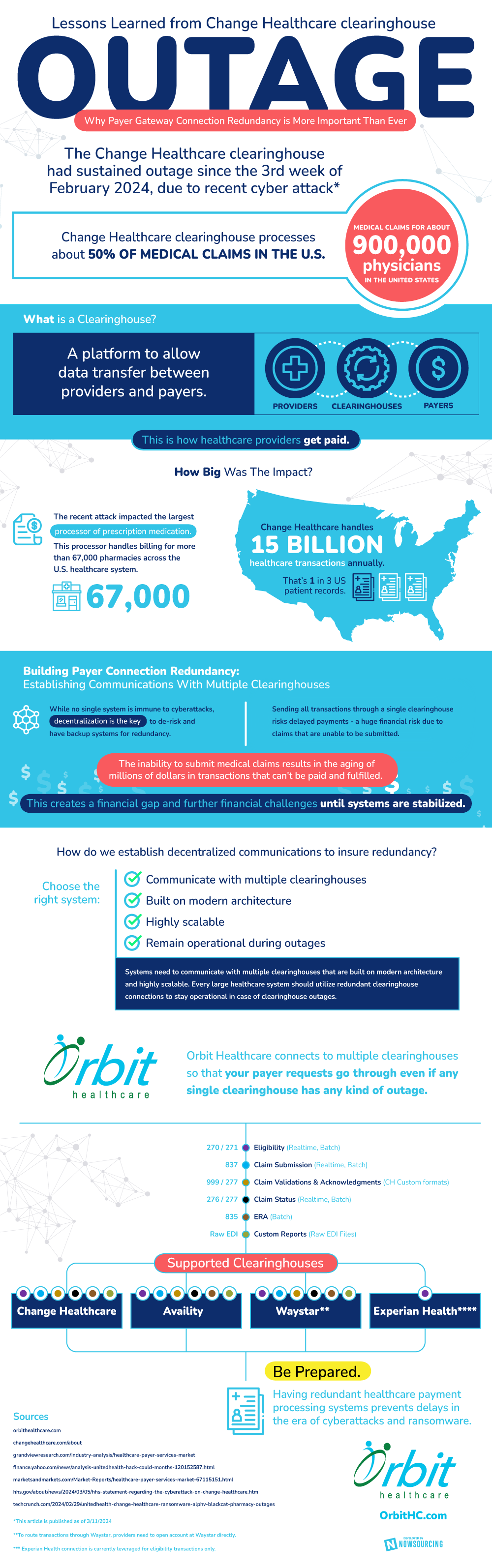
Payer gateway connection redundancy is extremely important in this day and age.  The recent Change Healthcare clearinghouse outage illustrates this importance, as the outage has had sweeping consequences. 

For context, a cyber attack resulted in a sustained outage in the Change Healthcare clearinghouse, impacting thousands of physicians and healthcare institutions.  The attack impacted the largest processor of prescription medication in the United States, which handles billing for more than 67,000 pharmacies. 

Outages can prevent clearinghouses from transferring data between providers and payers.  When this happens, medical claims cannot be submitted, which results in the aging of millions of dollars in transactions that cannot be paid.  Until systems are stabilized, this leads to financial challenges. 

Payer gateway connection redundancy is a method of avoiding outages.  This redundancy involves establishing communications with multiple clearinghouses.  Decentralization ensures that, even if one clearinghouse suffers a cyber attack and outage, other clearinghouses can still carry out payer requests. 

Certain systems can help set up payer connection redundancy.  These systems should be able to communicate with several clearinghouses, be built on modern architecture, be highly scalable, and remain operational during outages.  

In an era of cyber attacks and outages, redundancy is more important than ever.  It can maintain the successful transfer of data, reducing overall risk and increasing clearinghouse resiliency.

Lessons Learned from the Change Healthcare Cyberattack
Source: Orbit Healthcare