Home Blog Page 49

Understanding Ransomware: Prevention and Response Strategies

0

Cyberattacks are becoming increasingly sophisticated, and ransomware remains one of the most dangerous threats to both businesses and individuals. With ransomware attacks continuing to target small businesses, understanding how to prevent and respond to these incidents is no longer optional—it’s essential. This guide will walk you through actionable steps to upgrade your IT security, safeguard your systems, and recover if an attack occurs.

1. Recognize How Ransomware Works

Ransomware is a type of malicious software designed to block access to your data or systems until a ransom is paid. Hackers typically gain access through phishing emails, malicious websites, or unprotected networks, locking you out of your files. Recognizing the signs of a ransomware attack—such as unexpected file encryption and strange ransom notes—can help you act quickly before the damage worsens.

Tip:

Educate your team or employees to recognize phishing attempts and suspicious links in emails. Tools like phishing simulators can help you prepare them for real-life scenarios.

2. Regularly Backup Your Data

One of the best defenses against ransomware is regular data backups. If your data is backed up securely, you won’t be at the mercy of cybercriminals. However, make sure these backups are stored in a secure, offline location or on cloud systems with strong encryption.

Tip:

Schedule automatic backups and test their restoration processes periodically. Platforms like Backblaze or AWS Backup can provide added reliability.

3. Update and Patch Software

Hackers often exploit vulnerabilities in outdated software to infiltrate systems. Keeping your software, systems, and applications up to date is one of the easiest ways to close security loopholes. Regular updates enhance your security by patching vulnerabilities and keeping cybersecurity defenses aligned with current threats.

Tip:

Enable automatic updates wherever possible or schedule routine manual upgrades. Tools like WSUS (Windows Server Update Services) allow businesses to manage patches company-wide.

4. Use Endpoint Security and Firewalls

Ensure your devices and networks are protected through advanced security measures, such as endpoint detection and response (EDR) tools and firewalls. These tools monitor activity, detect ransomware infections early, and isolate the threat before it spreads across your systems.

Example:

Major organizations, including healthcare providers, have successfully used endpoint security tools like CrowdStrike and SentinelOne to neutralize ransomware outbreaks before causing extensive harm.

Tip:

Combine antivirus software with EDR solutions and next-gen firewalls for a multi-layered defense approach.

5. Develop a Ransomware Response Plan

Preparation is key when dealing with any ransomware attack. A well-outlined response plan ensures that all stakeholders know how to act during an incident. This includes isolating infected systems, notifying IT teams, reporting to authorities, and determining whether restoring from backups is viable.

Tip:

Conduct regular ransomware drills to test your response plan, and assign specific roles to team members for clear accountability during an emergency.

6. Partner with Cybersecurity Experts

Sometimes, the expertise required to defend against ransomware is beyond what internal teams can manage. Working with reliable cybersecurity providers or consultants ensures access to 24/7 monitoring, threat intelligence, and proactive threat mitigation tailored to your organization.

Tip:

Providers like Palo Alto Networks, Sophos, or local managed security service providers (MSSPs) can help fortify your defenses and assist during breaches.

7. Never Pay the Ransom

If faced with a ransomware attack, avoid paying the ransom at all costs. There’s no guarantee the hackers will release your data, and payment only encourages further attacks. Instead, focus on containment and recovery through backups and IT support.

Tip:

Report attacks to local authorities or agencies like CISA (Cybersecurity and Infrastructure Security Agency) to get professional guidance and connect with recovery teams.

Take Action Today

Ransomware is a growing threat, but it’s not unbeatable. By implementing these prevention and response strategies, you’re not only protecting your data but also building long-term resilience against evolving cyber threats. Start today by educating your team, backing up your critical data, and evaluating your current cybersecurity measures.

5 Ways to Organize IT Infrastructure

0

A well-organized IT infrastructure is the backbone of any successful business. Whether you’re managing a small startup or a large enterprise, having a streamlined setup can save you time, reduce costs, and improve overall efficiency. But where do you start, and what changes make the biggest impact? This article will walk you through five practical strategies to transform your IT infrastructure into a more organized and effective system. 

1. Perform a Comprehensive IT Audit 

Before making changes, it’s essential to understand exactly what you’re working with. Conduct an IT audit to evaluate your current infrastructure. 

  • Take inventory of all hardware, software, and devices in use—this will help you identify redundancies or outdated systems. 
  • Assess your network’s performance and pinpoint areas for optimization or repair. 
  • Compare the costs of your tools and subscriptions against their ROI. 

2. Consolidate Your Tools and Systems 

Using a wide array of disconnected tools? It might be time to consolidate. 

Systems that don’t integrate can cause communication gaps, inefficiencies, and bottlenecks. Look for ways to use fewer tools that perform multiple functions—especially those that integrate well with one another. 

For instance, platforms like Microsoft 365 or Google Workspace combine essential tools (like email, file storage, task management, and collaboration) into one reliable system. This helps eliminate confusion and ensures smooth workflows. 

3. Implement Standardized Policies 

Every well-organized IT infrastructure relies on consistent processes and policies. Standardize how software is installed, data is stored, and permissions are granted. 

  • Develop clear policies for password management, file naming conventions, and data backups. 
  • Train employees on IT best practices to ensure consistency. 

Standardization reduces the likelihood of errors and makes troubleshooting easier when issues arise. Plus, it strengthens cybersecurity protocols by ensuring compliance across your entire organization.  

4. Leverage Automation Wherever Possible 

Manual processes can slow down your IT team and introduce avoidable errors. Automation tools can handle repetitive tasks with precision and free up your team to focus on more meaningful work. 

  • Use automation to perform daily backups, monitor system health, and schedule updates. 
  • Tools like Zapier, Jenkins, and Ansible can integrate with your infrastructure to automate tasks across various systems. 

5. Prioritize Scalability and Flexibility 

Your IT infrastructure should grow with your business. Plan for scalability by implementing cloud-based solutions or hybrid infrastructures that can expand as needed. 

  • Migrate workloads to cloud platforms like AWS, Azure, or Google Cloud to ensure flexible storage and compute power. 
  • Virtualization tools allow you to quickly spin up new environments without investing in additional physical hardware. 

Having a future-proof IT infrastructure reduces downtime, improves adaptability, and ensures you stay ahead of your competition. By prioritizing scalability, you can ensure business success down the road as well. 

Final Thoughts 

An organized IT infrastructure is crucial for driving business efficiency and staying competitive in today’s fast-paced world. By auditing your assets, consolidating tools, standardizing policies, leveraging automation, and planning for scalability, you can create a streamlined system that supports your business goals. Take the first step today—evaluate your current setup and identify one area for improvement. Small changes can lead to significant results.

Waterfowl Hunting: A Tradition of Strategy, Skill, and Patience

0

Waterfowl hunting is a time-honored tradition that blends patience, skill, and strategy in pursuit of ducks and geese. For generations, hunters have taken to wetlands, marshes, and open fields to experience the thrill of the hunt and the satisfaction of connecting with nature. Whether you’re a seasoned waterfowler or a beginner looking to get started, understanding the fundamentals of this sport is key to success.

Understanding Waterfowl Habits

The first step in becoming a successful waterfowl hunter is understanding the habits and behaviors of your quarry. Ducks and geese are migratory birds that follow predictable patterns based on seasonal changes. Their movements are influenced by factors such as weather, food availability, and day length.

Hunters often study migration routes and feeding behaviors to determine the best locations for setting up a hunt. Early mornings and late afternoons are prime times, as these are when waterfowl are most active. Additionally, scouting hunting grounds to observe bird behavior can significantly increase your chances of success.

Essential Gear for Waterfowl Hunting

Having the right gear is critical for a productive and enjoyable hunt. While personal preferences and hunting styles may influence specific choices, there are a few essentials every waterfowler needs:

  1. Firearms and Ammunition: A shotgun is the primary tool for waterfowl hunting. Popular gauges include 12 and 20, with non-toxic shot being required in most areas to protect wetland environments.
  2. Decoys: Realistic decoys are indispensable for attracting birds within range. They mimic the appearance and behavior of ducks or geese, making your setup appear safe and inviting to passing flocks.
  3. Calls: Duck and goose calls are used to replicate the sounds of waterfowl, further luring them toward your decoys. Mastering these calls takes practice but is an invaluable skill for hunters.
  4. Blinds and Concealment: Staying hidden is crucial for success. Portable blinds, natural cover, and camouflage clothing help hunters remain undetected.
  5. Waders: Many hunts involve wet or muddy terrain, so waterproof waders keep hunters dry and comfortable.
  6. Safety and Navigation Tools: Items such as life vests, GPS devices, and communication equipment are essential for ensuring a safe hunting trip.

Techniques for a Successful Hunt

Waterfowl hunting requires a combination of strategy and skill. Setting up your decoys in the correct formation is critical to creating a realistic scene that attracts birds. Common decoy setups include the J-hook, V-shape, and U-shape, each tailored to specific wind and flight conditions.

Calling is another important technique. Different calls can convey feeding, contentment, or urgency, which help draw birds closer. Timing and moderation are key; over-calling can spook wary waterfowl.

Shooting proficiency is also vital. Practice shooting at clays to improve accuracy and confidence. Be mindful of ethical hunting practices, ensuring clean and humane shots.

Conservation and Respect for Nature

Waterfowl hunting has a deep-rooted connection to conservation. Organizations like Ducks Unlimited and others have worked tirelessly to protect wetlands and wildlife habitats, ensuring sustainable hunting for future generations. Hunters contribute significantly to these efforts through license fees and equipment taxes, which fund habitat restoration and wildlife management.

Ethical hunters also practice responsible hunting by following bag limits, avoiding overharvesting, and respecting the land. This ensures healthy waterfowl populations and preserves the balance of natural ecosystems.

A Community of Enthusiasts

One of the most rewarding aspects of waterfowl hunting is the sense of community it fosters. Whether it’s sharing tips with fellow hunters, teaching newcomers, or participating in conservation efforts, the camaraderie among waterfowlers is unmatched. Brands like Dive Bomb Industries have become synonymous with this community, offering high-quality gear that enhances the hunting experience and supports the tradition of waterfowl hunting.

The Joy of the Hunt

For many, waterfowl hunting is about more than the harvest. It’s an opportunity to connect with nature, challenge oneself, and create lasting memories with friends and family. The thrill of seeing a flock respond to your decoys, the camaraderie in the blind, and the quiet moments surrounded by natural beauty make waterfowl hunting a truly unique experience.

Whether you’re a lifelong enthusiast or just starting your journey, waterfowl hunting offers endless opportunities for adventure, learning, and connection with the great outdoors.

How To Build Your Online Brand Properly With a Mobile App Development Partner

0

In the internet era of the world, having an online presence is paramount for business success. This is especially important for startups, who need to take any opportunity they can get more exposure. But it’s important that a business’s mobile app has a competitive advantage in order to allow it to grow.

Firstly, a good business app must put user experience first. This means it must be easy to access and simple to use for customers. Once the application has been created with these specifications, it has passed the Initial Iterations phase and your company can focus on spreading its reach. Fortunately, mobile applications allow you to cost-effectively grow your reach, with up to 9900% ROI potential. Additionally, with the in-app spending average expected to grow 267% by 2030, establishing a profitable app now will pay greater dividends in the future too.

Unfortunately, creating a mobile is not just as easy as snapping your fingers. Fortunately, there are mobile app development partners that can make it very easy for your company. Partners like Tapptitude have developed well over 150 apps across over 10 industries. To help build your brand’s online presence, using a trusted mobile app partner is essential for you and your business.

App Development Partner for Startup
Source: Tapptitude

Transforming HR Tech PR

0

HR workers are now able to  work more efficiently and accurately thanks to HR tech. This software and hardware is transforming human resources procedures, including onboarding, training, and hiring employees. Roughly 75% of HR professionals think this technology improves the way companies recruit candidates, and 82% of companies think HR tech is crucial to their success.

There are several types of softwares that serve to improve the employee experience. Applicant tracking systems (ATS) have become a vital tool for managing the recruiting and hiring process for candidates. ATS is used by the overwhelming majority (97.4%) of Fortune 500 businesses to track candidate data and hiring progress. Software for performance management is also useful for tracking the goals, performance, and objectives of employees. Performance management software, such as HireRoad, can result in a 50% decrease in attrition rates, a 25% improvement in business productivity, and an 80% increase in recruiting efficiency.

There are many types of additional HR technology that are proving useful to businesses, such as workflow automation systems, candidate relationship management software, and talent marketplace platforms. The integration of this cutting-edge technology into HR procedures not only simplifies operations but also raises employee satisfaction levels, which makes it an essential component of a successful business. Learn more about HR tech and finding the right HR tech PR agency below:

HR Tech PR Agency
Source: Talent Tech PR

How to Speed Up Prior Authorization For Your Patients

0

In order to conserve resources and protect against frivolous spending, insurance companies developed the idea of ‘prior authorizations’ (PA). In essence, it requires healthcare providers to obtain authorization for healthcare services before proceeding in order to get insurance companies to pay for the procedures. Unfortunately, an unintended consequence is that access to care for many has been drastically impaired. 27% of physicians say their claims are almost always denied and around 75% say that denied claims increased by some extent in the past 5 years.

The repetitive process of completing PA requests and reapplying hoping for a better outcome can be taxing on any administrative team. Nearly 70% of all providers are still manually completing prior authorization requests, either with a dedicated PA team or with a broader administrative staff. 

Fortunately, there is a better way via prior authorization process automation. This new technology takes less than 5 minutes to perform the prior authorization process and reduce turnaround time by 55%. Most importantly, it frees up 12 hours a week for each administrative worker in the office, which helps them focus on better patient experiences. While doing prior authorizations is unavoidable, getting them done with automated PA systems makes them easy.

Prior Authorization Automation
Source: Orbit Healthcare

How to Create an Effective Disaster Recovery Plan

0


No matter the industry, disasters—both natural and man-made—can disrupt operations, compromise sensitive data, and cause lasting damage to any organization. Having an effective disaster recovery (DR) plan in place is critical to minimize downtime, ensure data protection, and maintain business continuity. But how do you create a reliable disaster recovery plan? Below, we’ve outlined actionable steps to get your organization prepared for the unexpected.

What is a Disaster Recovery Plan?

A disaster recovery (DR) plan is a documented strategy that outlines how an organization will respond to and recover from disruptive events or failures, such as cyberattacks, hardware failure, natural disasters, and human error. It ensures that critical systems, applications, and data can be restored efficiently, reducing financial and operational losses.

Unlike business continuity plans, which focus on maintaining overall operations during a crisis, a DR plan zeroes in on IT infrastructure and recovery processes.

Steps to Create an Effective Disaster Recovery Plan

1. Assess Potential Risks

The first step in crafting a DR plan is identifying potential risks your organization may face. These may include:

  • Natural disasters like floods, earthquakes, or hurricanes.
  • Cybersecurity threats, including ransomware attacks or data breaches.
  • Power outages and hardware failures.
  • Human errors that could lead to data loss or downtime.

Conduct a risk assessment to understand which events are most likely to affect your organization and the potential impact. This will help you prioritize which systems and processes need the most protection.

2. Identify Mission-Critical Systems

Not all systems, applications, and data hold the same level of importance for your operations. Work with department heads and IT professionals to evaluate which assets are critical to business continuity. For example:

  • Customer databases
  • Financial systems
  • E-commerce platforms
  • Communication tools like email and messaging systems

This helps you focus your recovery efforts on the areas with the highest impact, ensuring that essential services are restored quickly in the event of a disaster.

3. Establish Clear Recovery Objectives

Your DR plan should include two key metrics:

  • Recovery Time Objective (RTO): How quickly you need to restore systems after a disaster to minimize operational disruptions.
  • Recovery Point Objective (RPO): The maximum amount of data loss your organization can tolerate, expressed in time (e.g., a 4-hour RPO means you can afford to lose up to 4 hours of data).

Define these objectives based on your business needs and industry standards. They guide your recovery timeline and help you evaluate the level of investment required in backup systems and solutions.

4. Implement Data Backup Strategies

Backing up your data is one of the most critical components of a disaster recovery plan. Adopt a reliable backup strategy that includes:

  • Regular automatic backups: Ensure data is backed up frequently to minimize the risk of loss.
  • Offsite storage options: Use cloud-based solutions or remote servers to store copies of critical data at a secure location.
  • Redundancy: Maintain multiple backup copies to protect against system failures.

Test your backup systems periodically to verify that data recovery is fast and accurate.

5. Create a Communication Plan

During a disaster, clear communication is essential to prevent chaos and confusion. Outline a communication strategy that includes:

  • Contact lists for employees, stakeholders, and vendors.
  • Pre-drafted messages for different scenarios.
  • Chain of command to ensure accountability and quick decision-making.

Disasters often happen when least expected, so ensure that all stakeholders are informed of their roles and responsibilities ahead of time.

6. Test and Update the Plan Regularly

A disaster recovery plan is not a one-and-done document. Systems evolve, threats change, and operations expand, so regular updates are critical. Conduct scheduled testing to evaluate:

  • Whether recovery times align with your RTOs and RPOs.
  • The efficacy of your backup solutions.
  • Employee understanding of their roles during a disaster.

Set a review timeline (e.g., annually or biannually) to keep your DR plan relevant and effective.

7. Incorporate Security Measures

Preventing disasters is just as important as planning for recovery. Implement robust cybersecurity measures, such as firewalls, antivirus software, and employee training on phishing scams. These steps can mitigate risks and limit the potential damage of an incident.

Why is a Disaster Recovery Plan Critical?

Without a comprehensive DR plan, the cost of downtime can be devastating—both financially and reputationally. According to studies, the average cost of IT downtime is $5,600 per minute, and small to mid-sized businesses are especially vulnerable. A well-prepared plan ensures that normal operations are restored quickly, reducing disruptions and fostering trust among clients, employees, and stakeholders.

Final Thoughts

A robust disaster recovery plan is a non-negotiable necessity in today’s fast-paced, tech-driven world. By assessing risks, prioritizing essential systems, and maintaining reliable backups, organizations can confidently face adversity. Remember, a proactive approach to DR planning could be the difference between bouncing back stronger or facing prolonged challenges.

Don’t wait until disaster strikes to act. Start crafting your disaster recovery plan today and shield your organization from the unexpected.

The Role of Managed IT in Supporting Remote Workforces

0

Remote work is no longer a novelty—it’s the new reality for businesses worldwide. For many companies, adapting to this shift meant navigating uncharted waters, from maintaining productivity to securing sensitive data beyond office walls. Enter managed IT services, a game-changer in supporting remote workforces and ensuring business continuity.

This post explores how managed IT plays a pivotal role in enabling seamless operations for remote teams. From enhanced collaboration tools to robust cybersecurity solutions, businesses equipped with managed IT services are better prepared for the evolving demands of a remote-first world.

Seamless Collaboration Made Simple 

Collaboration is the heartbeat of remote work. Yet, fostering effective teamwork becomes challenging when employees are spread across states, countries, or even continents. Managed IT services tackle this obstacle by facilitating access to advanced collaboration tools. 

Platforms like Microsoft Teams, Zoom, and Slack have become workplace staples, but managing these tools requires expertise. Managed IT providers ensure these applications run optimally, enabling teams to connect, share documents, and communicate effortlessly. This reduces downtime and ensures that remote employees remain as productive as they would be in an office setting.

Furthermore, managed IT professionals streamline software updates and provide employee training on these platforms. When tech hiccups arise—and they will—they offer immediate assistance, so your team can focus on what matters most.

Strengthening Cybersecurity in Remote Settings 

The growing reliance on remote work also brings increased risks to cybersecurity. Home networks often lack the protective measures of corporate environments, making businesses vulnerable to data breaches, ransomware attacks, and other cyber threats. 

Managed IT services close this security gap by implementing advanced cybersecurity protocols. They set up secure Virtual Private Networks (VPNs), ensuring safe access to company resources from any location. Multi-factor authentication (MFA) and endpoint protection are other solutions managed IT providers deploy to shield businesses from potential breaches. 

Additionally, managed IT services monitor network activity around the clock. This proactive threat detection allows them to neutralize risks before they escalate, giving business leaders peace of mind that their sensitive information is safeguarded no matter where their teams are working.

Improving IT Infrastructure on a Budget 

Investing in the right technology to support a remote workforce often feels overwhelming—and expensive. Managed IT services help businesses overcome this financial hurdle by offering scalable solutions tailored to their specific needs. 

Instead of purchasing costly equipment upfront, companies can utilize cloud-based systems optimized by managed IT providers. These systems are not only cost-effective but also highly flexible, allowing businesses to scale resources as their needs evolve. Whether you need additional storage for your growing team or enhanced bandwidth during peak hours, managed IT services make it happen without breaking your budget. 

More importantly, managed IT reduces unexpected costs associated with tech failures or outages. Their proactive maintenance ensures your IT infrastructure remains resilient, sparing you the expenses that come with prolonged downtime.

Empowering the Future of Work 

Remote work is here to stay, and the businesses that thrive will be the ones that prioritize adaptability and innovation. Partnering with a managed IT provider does more than just “keep the lights on.” It empowers organizations to exceed employee expectations, tackle modern security challenges, and streamline operations, all while staying cost-effective. 

Whether you’re a startup transitioning to remote work or an established company seeking to optimize your IT systems further, managed IT services offer an invaluable edge. By enhancing collaboration, safeguarding data, and reducing operational costs, they’re not just supporting your team today—they’re building the foundation for tomorrow’s success.

The Impact of IoT on Smart Building Development and Management

0

The Internet of Things (IoT) has transformed the way we live, work, and interact with our environment and local communities. It’s now reshaping the design, construction, and management of smart buildings. This article explores five crucial ways in which IoT is revolutionizing smart building development and management, offering insights and practical tips for professionals in the field.

Enhanced Energy Efficiency

Smart buildings equipped with IoT devices can significantly reduce energy consumption. These devices monitor and adjust energy usage in real-time, ensuring optimal efficiency. For example, smart thermostats automatically adjust heating and cooling based on occupancy and weather conditions. According to the U.S. Department of Energy, commercial buildings can save significant energy costs by implementing smart technologies. By investing in IoT technologies, building managers can achieve substantial cost savings and reduce their environmental footprint.

Improved Security and Surveillance

IoT devices provide robust security and surveillance solutions, enhancing the safety of smart buildings. Smart cameras, sensors, and access control systems can monitor activities and identify potential security breaches. For instance, IoT-enabled access control systems can manage entry permissions remotely, ensuring only authorized personnel access restricted areas. Implementing IoT-based security solutions can help protect assets and occupants, offering peace of mind to building managers and tenants alike.

Streamlined Facility Management

IoT technology simplifies facility management by automating routine tasks and providing real-time data. Sensors connected to building systems monitor equipment performance and predict maintenance needs, reducing downtime and repair costs. Research suggests that IoT solutions can lower facilities management costs by up to 20%. By leveraging IoT in facility management, managers can optimize operations, improve building performance, and extend the lifecycle of critical assets.

Enhanced Occupant Experience

IoT technology can significantly enhance the occupant experience by creating a more comfortable and personalized environment. For example, IoT-enabled lighting and HVAC systems adjust settings based on user preferences, improving comfort and productivity. By focusing on the occupant experience, building owners can attract and retain tenants, driving higher occupancy rates and rental income.

Data-Driven Decision Making

IoT generates vast amounts of data, which can be used to improve decision-making in smart building management. Building managers can analyze data from sensors and connected devices to gain insights into usage patterns, operational inefficiencies, and occupant preferences. This data-driven approach enables informed decision-making, leading to better resource allocation and more effective building management strategies. Integrating IoT into building management allows for continuously optimizing systems and processes, maximizing ROI.

The integration of IoT in smart building development and management is revolutionizing the industry. By enhancing energy efficiency, improving security, streamlining facility management, and enhancing the occupant experience, IoT technology offers significant benefits for developers and managers. Adopting IoT solutions not only leads to cost savings but also improves sustainability and competitiveness in the market. 

Future Possibilities

The potential of IoT in smart building development and management is limitless. As technology continues to advance, new possibilities are emerging for even more intelligent and efficient buildings. Smart devices and systems can be further integrated and interconnected to create a truly seamless experience for occupants. For example, IoT-enabled elevators can communicate with lighting systems to adjust when occupancy levels change, optimizing energy usage even further. Start exploring IoT solutions today and discover how they can transform your building into an intelligent, efficient space.

Adapting to Workforce Changes with Skills-Based Learning and Development

0

Wouldn’t it be great if your workforce could adapt quickly to industry changes? A solution to this is creating custom skills-based learning and development training programs to strengthen employee skills and increase their scope of knowledge. Many employees are attracted to companies that offer continuous training, and companies benefit from increased bottom-line profits.  

Several companies are struggling to rise above the competition due to their inability to respond to the latest technology and talent problems. The lack of necessary skills further hold them back from responding appropriately to change. With skills-based learning and development training courses, companies can better drive human-centered success. 

AI-enriched skills-based training is a custom-developed, high-quality, cost-effective way to adapt to industry changes with courses being developed in just a matter of weeks. AI-supported course development also helps keep costs down compared to conventional course development while having quick turnaround times. Skills-based training uses the latest research and best practices so companies know they are getting top-quality educational content on any topic. 

With custom skills-based learning and development training, companies are able to attract the top talent and eliminate skill gaps that employees might have while improving business outcomes. Skills-based training could be the learning and development your business needs for rapid staff development.

YU Global - The Global Difference with skills-based training
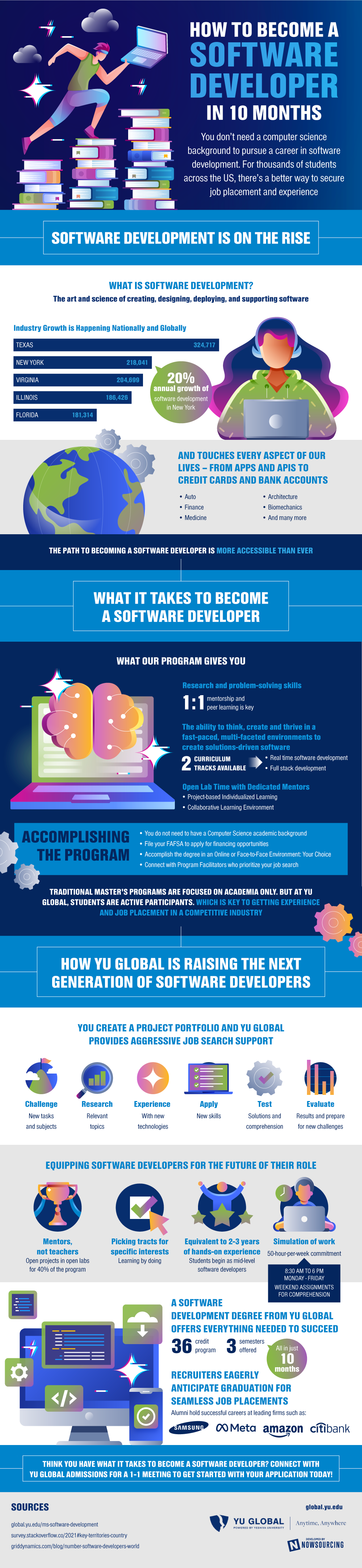
Source: YU Global